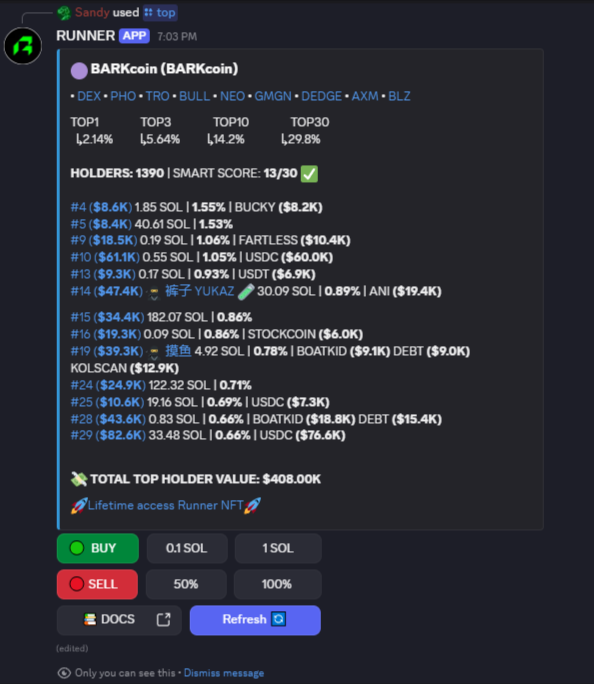
# Commands & Report
{% hint style="success" %}
**Discord commands are similar to the Runner on Telegram, since the structure of the report is unified.**
{% endhint %}
**First, please refer to the extensive info on each command and what to pay attention to when analysing a token 👉**[bot-commands](https://runner-bot.gitbook.io/runner-bot-docs/bot-commands "mention")**👈**
***
#### HOW TO USE COMMANDS ON DISCORD:
1. Go to [🤖• ca-reports](https://discord.com/channels/1354492093426303158/1404461182001348638) on Runner server, or to the channel where Runner bot was integrated on your server.
2. Start typing any command available in that channel, for example `/top` and insert the CA (token address), press enter.
3. The bot will respond by running the report for the top smart holders for this CA.
#### **Token analytics commands ⇒** [**🤖• ca-reports**](https://discord.com/channels/1354492093426303158/1404461182001348638)
• `/top ` - Get token holders report \
• `/kols ` - Get KOLs report \
• `/dev ` - Get dev activity report \
• `/full ` - Get full analysis report \
• `/ai ` - Get AI analysis of the token
#### **Info commands ⇒** [🤖• commands](https://discord.com/channels/1354492093426303158/1409453984716165171)
`/help` - Docs and guide
`/support` - Get contacts of the support rep
`/ref` - Manage referrals also available in referral-program channel via button
`/pay` - Upgrade subscription also available in 💳subscription channel via button 'pay'
`/holdings` - access your wallet address, balance and check what you hold.
`/trading` - set up default buy, sell & slippage parameters. Export your wallet private key if needed.
To learn more about Runner trading features and how to trade instantly, check [trading](https://runner-bot.gitbook.io/runner-bot-docs/discord/trading "mention")
.png?alt=media&token=b00c17cf-fae0-40ba-a635-58896da615b0)